Guide
Build an AI Data Analyst
Set up a local AI data analyst that can read your warehouse context, use Bruin MCP, and answer the first business question with SQL-backed analysis.
What
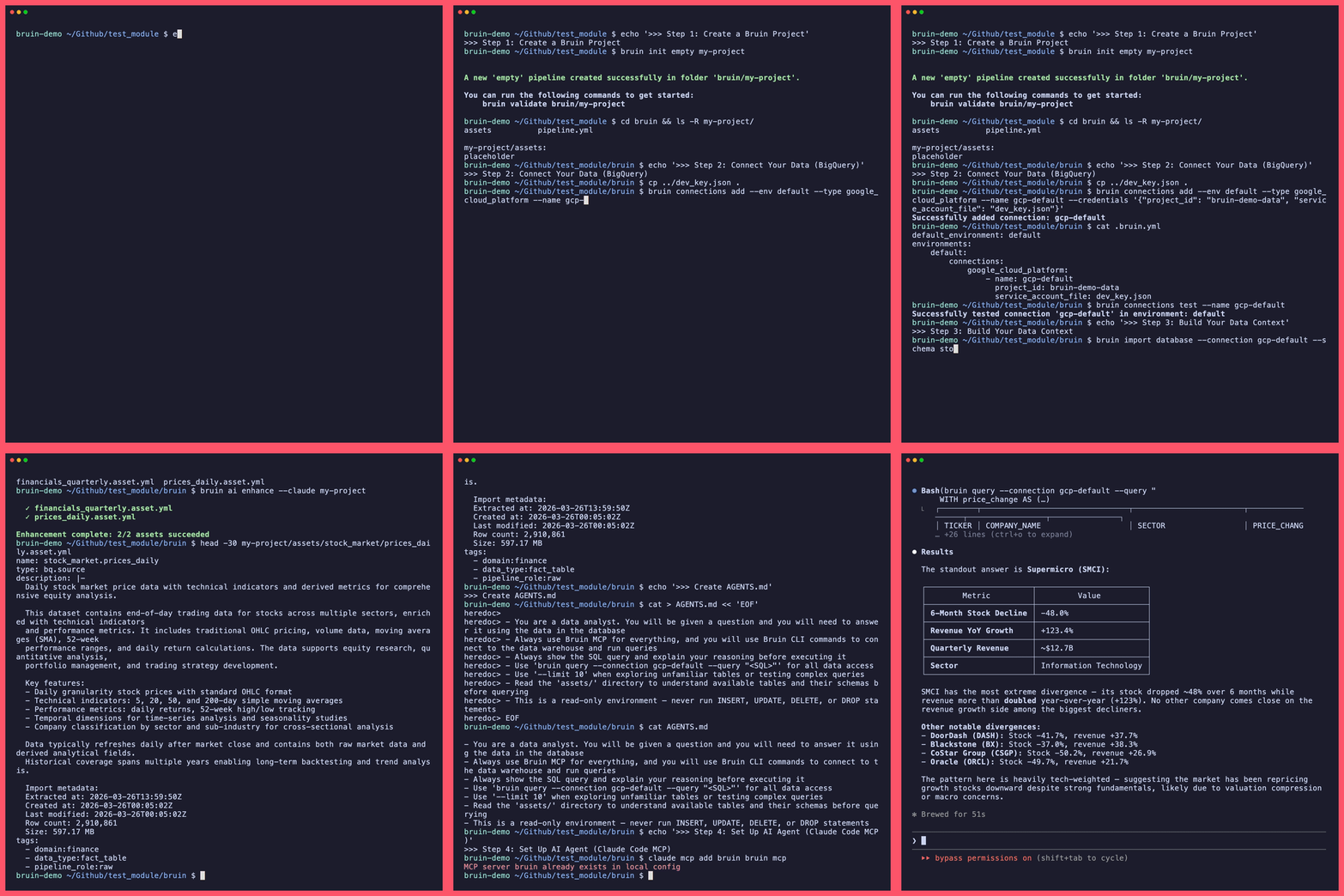
Create a Bruin project that gives an AI data analyst the context it needs to answer warehouse questions safely. You will import schema metadata, add descriptions and quality checks, wire an AI coding tool to Bruin MCP, and ask the first SQL-backed business question.
By the end, you will be able to:
- Create a Bruin project to hold warehouse metadata, quality checks, and agent instructions
- Connect BigQuery, Redshift, ClickHouse, or Postgres so Bruin can import schema and run queries
- Wire Cursor, Claude Code, or Codex to Bruin MCP and ask the first analysis question
How
Start with an empty Bruin project and add a read-only warehouse connection. Import and enhance table context before giving the agent query access, then use AGENTS.md and optional glossary/docs context to keep answers grounded.
Before you start
- Bruin CLI installed
- A data warehouse with data already loaded (BigQuery, Redshift, ClickHouse, or Postgres)
- An AI coding tool installed (Cursor, Claude Code, or Codex)
Guide overview
- 1Create a Bruin ProjectInitialize a Bruin project - the local workspace that will hold your database metadata, quality checks, and agent context.
- 2Connect Your DataAdd your data warehouse as a connection so Bruin can reach your tables and the AI agent can query them.
- 3Build Your Data ContextImport your database schema and enrich it with AI-generated descriptions, quality checks, and tags - so the agent actually understands your data.
- 4Set Up Your AI AgentConnect Bruin to your AI coding tool via MCP so the agent can read your data context and query your warehouse.
- 5Analyze Your DataCreate an AGENTS.md with domain-specific context, then put your AI analyst to work answering real business questions.
- 6Improve Your ContextGo further with a Bruin Glossary for shared business definitions and external MCP servers like Notion or Confluence to pull in even more domain knowledge.
Get help & contribute
What
Create a Bruin project that gives an AI data analyst the context it needs to answer warehouse questions safely. You will import schema metadata, add descriptions and quality checks, wire an AI coding tool to Bruin MCP, and ask the first SQL-backed business question.
By the end, you will be able to:
- Create a Bruin project to hold warehouse metadata, quality checks, and agent instructions
- Connect BigQuery, Redshift, ClickHouse, or Postgres so Bruin can import schema and run queries
- Wire Cursor, Claude Code, or Codex to Bruin MCP and ask the first analysis question
How
Start with an empty Bruin project and add a read-only warehouse connection. Import and enhance table context before giving the agent query access, then use AGENTS.md and optional glossary/docs context to keep answers grounded.
Before you start
- Bruin CLI installed
- A data warehouse with data already loaded (BigQuery, Redshift, ClickHouse, or Postgres)
- An AI coding tool installed (Cursor, Claude Code, or Codex)
Guide overview
- 1Create a Bruin ProjectInitialize a Bruin project - the local workspace that will hold your database metadata, quality checks, and agent context.
- 2Connect Your DataAdd your data warehouse as a connection so Bruin can reach your tables and the AI agent can query them.
- 3Build Your Data ContextImport your database schema and enrich it with AI-generated descriptions, quality checks, and tags - so the agent actually understands your data.
- 4Set Up Your AI AgentConnect Bruin to your AI coding tool via MCP so the agent can read your data context and query your warehouse.
- 5Analyze Your DataCreate an AGENTS.md with domain-specific context, then put your AI analyst to work answering real business questions.
- 6Improve Your ContextGo further with a Bruin Glossary for shared business definitions and external MCP servers like Notion or Confluence to pull in even more domain knowledge.
Resources
Get help & contribute